How to Deposit on H555 Game
H555 Game accepts JazzCash, EasyPaisa and direct bank transfer. Most deposits land in your wallet within a few minutes. This guide covers the exact steps for each method, plus what to do if a deposit doesn't show up.
Deposit Steps
The overall flow is the same for every method, but the exact screen you confirm on differs. Pick your payment method below for the full walkthrough.
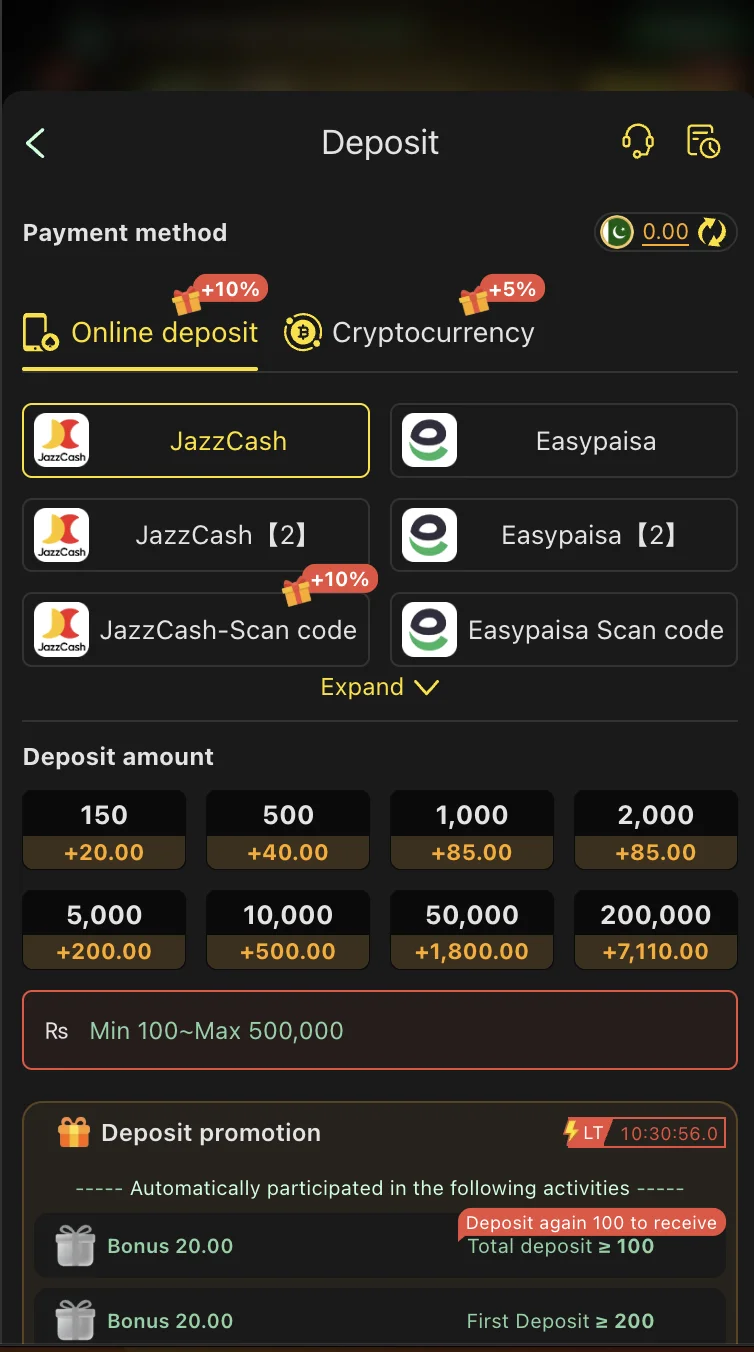
Open the Deposit section
Log in to the H555 app and go to the "Deposit" or "Recharge" section from your wallet balance or the home screen.
Select JazzCash
From the list of payment methods, tap JazzCash. The app shows the account number or details to send your funds to.
Enter your deposit amount
Type the amount you want to add, checking the minimum and maximum shown on screen first.
Send the money in the JazzCash app
Switch to JazzCash, send the exact amount to the account shown, and confirm with your MPIN. Wait for JazzCash's own success message before backing out.
Keep the transaction ID
Keep the JazzCash transaction ID handy in case the deposit doesn't reflect or you need to contact support.
Return to H555 and check your balance
Your wallet should update automatically within a few minutes of JazzCash confirming the transaction.
Open the Deposit section
Log in to the H555 app and go to the "Deposit" or "Recharge" section.
Select EasyPaisa
Tap EasyPaisa and note the account details shown.
Enter your deposit amount
Check the minimum and maximum shown on screen first.
Send the money in the EasyPaisa app
Send the exact amount and confirm with your EasyPaisa PIN. Wait for the success confirmation before leaving the app.
Keep the transaction ID
EasyPaisa will show or text you a transaction ID - keep it for reference.
Return to H555 and check your balance
Your wallet updates automatically within a few minutes.
Open the Deposit section
Select Bank Transfer from the payment methods list.
Note the bank account details
The app displays the account number, bank name and account title to transfer to.
Transfer the exact amount
Use your own banking app or internet banking, matching the amount you entered in H555 exactly.
Save the transaction reference
Bank transfers can take longer to reflect than mobile wallets, especially outside banking hours, so keep the reference number for follow-up.
Wait for confirmation
Bank transfers may take longer than mobile wallets to reflect, particularly outside banking hours.
Check your H555 wallet
Once the bank confirms the transfer, your balance should update - contact support if it's been unusually long.
Comparing the Three Methods
JazzCash: typically the fastest option for most players - a mobile wallet-to-wallet transfer that usually reflects within minutes.
EasyPaisa: similarly quick, also mobile wallet-based, and a close second to JazzCash in practice.
Bank transfer: can take a little longer to reflect depending on your bank's own processing, especially outside banking hours - useful if you don't have JazzCash or EasyPaisa set up.
None of the three methods carry an H555-specific fee that we can quote here - any charge you see is typically applied by JazzCash, EasyPaisa or your bank for the transfer itself.
The Account-Matching Rule
Deposit from a payment account registered in your own name - not a family member's or friend's JazzCash, EasyPaisa or bank account. Withdrawals are sent back to the same account or source you deposited from, as a basic anti-fraud safeguard, so a mismatch here causes more delayed withdrawals than anything else in this category.
If Your Deposit Doesn't Reflect
Payment app confirmed it, but wallet balance hasn't updated: wait a few minutes first - most deposits land within that window. If it's been longer, contact support with your transaction ID.
Wallet shows the wrong amount: double-check the amount you actually sent versus what you intended - a typo when entering the deposit amount is the most common cause.
Payment app shows "pending" or "failed": the money likely hasn't left your account yet. Wait for your payment app's own resolution before assuming H555 is at fault.
You accidentally deposited twice: both transactions should reflect separately. If only one shows up, contact support with both transaction IDs.
Before contacting support for any deposit issue: have your registered number, the transaction ID, the exact amount, and the approximate time ready - this gets you a faster resolution than describing the issue alone.
Deposit Safety
Only use the official in-app payment options shown on the deposit screen - never send money to an account someone messages you directly, even if they claim to be H555 staff.
Never pay anyone claiming you need to "unlock" a deposit with an extra fee - this is a common scam pattern across the earning-app category.
Set a personal deposit budget before you start and treat it as money you could lose, not guaranteed income.
Funded and Ready
Once your wallet shows the new balance, browse the games list or check the bonus terms before you start playing.